Tuesday, August 13, 2013

Install a specific version of Node.JS

Quick post (personal reminder above all) about how to install a specific version of Node.js. I'm working on Ubuntu 12.04. The idea is to clone the whole repository and then checkout only the interested version. Then install it. Here are the commands.

git clone https://github.com/joyent/node.git
cd node
git checkout "v0.8.18"
export JOBS=2
./configure
make
make install

And you are good to go!

Monday, August 12, 2013

I'm still alive - !false and !undefined in JavaScript

Hi all, I've been very busy lately, and then I went for a holiday, so I didn't update the blog. Sorry!
I recently came back from the seaside and started to work on a bug I had since forever. I thought it was a deeply rooted bug that was spread in different methods. It turns out it was not like that. And that's what I discovered:

First of all, I had this array that kept count of how many distributed processes answered a pull request. Each process has an ID, and it corresponded with the index of the array. The array first is filled with false values. As an example, imagine process ID 0 that is polled. At first the value in the array at index 0 is false, but when the process answers, I set the value in the array at index 0 to true.

If the process don't reply after a certain threshold time, I execute something. I used to check this by going through the array in this way:

for(var i = 0; i < processes.length; i++)
    if(!array[i])
        //do something

In other words, if array[i] is false, it means the process did not answer.
This could look correct if only I would take into account the fact that, concurrently, some processes may be spawned, thus increasing the processes array. Since I didn't polled the newborn processes, I don't want them to be checked. Of course, with the shown code, this was happening. Luckily, JavaScript fills with undefined the indexes of an array which have not be initialised; but on the other hand the evaluation of !undefined is the same as the evaluation of !false. This clearly lead to a bug which always executed something, even if it was not the case. Again, luckily with JavaScript I could correct this very easily:

for(var i = 0; i < processes.length; i++)
    if(array[i] === false)
        //do something

And that's it!

Monday, July 1, 2013

Read a file line by line in node.js

Hi all. Today I decided to add a small functionality to my project: when I start my framework, I run stuff one after the other with a list of commands; I decided to add a functionality that reads a particular file (which I want to be a .k file) and extract the commands from that list.
To do so I need some things:

  1. Read a file
  2. Make sure it's a .k file
  3. Split it line by line
  4. Execute each line
Reading a file in node.js is very simple. We just need to import the fs module and call the function readFile:

fs.readFile(cmd[1], 'utf8', function(err, data) {
    if (err) throw err;
    //do something with the file
});

This will read the file specified in cmd[1] (which is the input variable I give). Next, I would like to add some more checks (for example, that it needs to be a .k file):
if(cmd[1].indexOf(".k") === cmd[1].length - 2){
    fs.readFile(cmd[1], 'utf8', function(err, data) {
 if (err) throw err;
 //do something with the file    
    });
}
else{
    console.log("Not a .k file!");
}

Finally, let's read the file line by line:
if(cmd[1].indexOf(".k") === cmd[1].length - 2){
    fs.readFile(cmd[1], 'utf8', function(err, data) {
 if (err) throw err;
 
 var commands = data.split('\n');
 for(var i = 0; i < commands.length; i++){
     //commands[i] contains lines of the input
 }    
    });
}
else{
    console.log("Not a .k file!");
}

Notice the .split('\n'); function, that splits the string into an array at every '\n' occurrence. Hope it helps!

Thursday, June 27, 2013

OUYA Development

Hi all. I've been quite busy lately. I travelled more than I expected and I didn't work much on JavaScript and my project. What I did was mostly bug fixing on not-so-interesting stuff, which did not lead me to interesting discoveries about the language in general.
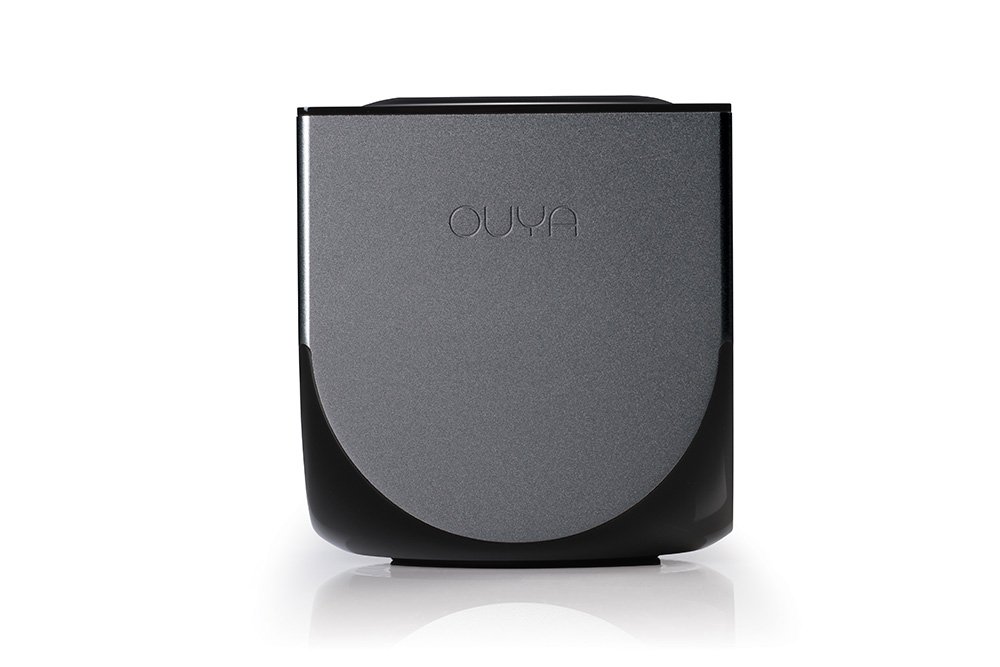
What I wanted to post today is about OUYA, this new gaming platform. It's a small console with an Android engine inside. You plug it to your TV through an HDMI cable and can start browsing the store to buy games.


Yesterday I installed the ODK, OUYA Development Kit, following the instructions here. I would like to try and write some games, as I have always been attracted by game development.
Since I don't own the console I thought I could not test what I produce. Luckily, there are some Android phones that have the same power more or less, so apparently test may be run on the virtual device from Eclipse. I will let you know if this is actually possible (I still don't see how to emulate the controller, for example...).

If I ever start programming something, I will show the outcomes here.

Tuesday, May 28, 2013

Closures...

I'm sorry for the long lack of updates. Recently I've been very busy. I travelled a lot and I had a lot of work to do, so not really much time to work on my project and discover new interesting things.
Today I want to post something that bothered me for a while. I was calling an asynchronous function, m_cli.get(), inside a for loop and wanted to keep the index variable as it was going to be used in the callback.
The first approach was the following, and of course was not working:

for(var i = 0; i < list.length; i++){
    mc_cli.get(list[i], function(err, response) {
        do_something(i);
    });
}


With this approach, the callback would always execute using the last value of i. So, for example, in the list was long 10, it would always call do_something(9). To fix the problem I tried with a closure:

do_something((function(x){return x})(i)) 


The idea is to "keep" somehow the variable so that it could call the function only when the callback returns and keeps the right index. Unfortunately, also this approach wont work. Also by creating the closure outside the for-loop and calling it in the callback would not lead to a satisfying result.
Later on, I managed somehow to fix the problem like this:

for(var i = 0; i < list.length; i++){
    (function(i){
        mc_cli.get( parsed_result.list[i], function(err, response) {
            do_something(i);
        });
    }(i));
}


The idea is that the parameter now is the input parameter of an anonymous function which will then call the asynchronous function and when the callback fires, call the do_something(i) which the local input parameter, which is the correct index (and not the last element of the array). Basically it will treat the index as an input parameter, thus "remembering" it through the execution of the asynchronous function.
Hope I helped somebody!

Friday, April 19, 2013

Running a script at startup with Raspberry Pi and Raspbian

First of all, I'm sorry for the lack of updates. I've been very busy with teaching and grading. Plus, my research is not leading me to discover new libraries or programming models, so I have nothing to write here.
Lately, I've been working with deploying my Raspberry Pi integrated with some sensors. I wanted to a robust deployment, but how to do that? Should I bring my monitor wherever I want to deploy the Pi to set it up?
Luckily there is a very easy way to do that. In this way, whatever happens (like power supply unplugged), whenever the Pi is turned on again, it will start again what it was doing, effectively removing the need of connecting it to a screen and a mouse/keyboard.
The procedure is very simple: the idea is to add a script to the /etc/init.d/ path as many of the scripts running at booting runs from there. Here's an example:

#! /bin/sh
# /etc/init.d/myscript
#

# do something like running your node.js server or client!
cd mystuff/mynodeserver/
node my_server.js

exit 0

Once you save this file in the location specified before, you should make it executable. I usually run  chmod 777 myfile.sh but some people prefer to give just the root the power to execute that, so they call chmod with 755 instead.
Once this is done, you just have to update the symbolic link to make the script execute at startup and that's it! To update them just run update-rc.d myscript default.
To remove it, run update-rc.d -f myscript remove.
And it is as simple as that. I hope I helped somebody with this little trick!


Thursday, April 4, 2013

ZeroMQ on Node.JS and Socket inspection

First of all, I'm sorry for the lack of updates. Lately I've been writing papers and not really coding. Moreover in the last few days I was on vacation, so no computer either.
Anyways. In my project I'm using ZeroMQ which is a very good socket library. I use that to make my workers communicate with each other.

Lately my main concern was message loss. Since I increase and decrease the number of workers, it may happen that some worker gets shut down when it is receiving, processing or sending a message.
The very first approach I had to solve the issue was to save the timestamp when a message was received and then wait some time. If a message was not received within that time (last_received_message - time_now > some_variable) then no messages will ever arrive anymore and I would shut down the worker. Moreover a flag would help me if a message is being processed (that is, when receiving a message a flag is set to true, when the message leaves the worker, the flag is set to false).

The problem is that I cannot possibly access the socket's queue to check what is inside and if I have to wait some more time before shutting the worker down. Eventually I found out about the getsockopt() function and its return values.
Before showing the code, I have to tell that this is not a final solution, nor the very right way to do it. For what concerns my sockets, I use PULL and PUSH. This means that I can only have two valid options for both. For the PULL socket which is read-only:

0 = nothing to read
1 = have something to read

For the PUSH socket which is write-only they are:
0 = can't write
2 = can write

BUT. The getsockopt(ZMQ_EVENTS) & ZMQ_POLLOUT > 0 does not mean there are no messages in the queue. It just means that the queue is not full and the socket is ready to accept some more for sending. On the other hand getsockopt(ZMQ_EVENTS) & ZMQ_POLLIN == 0 guarantees that the incoming queue is empty.


if(msg.command == 'kill'){
    setInterval(function(){
       var time_now = new Date().getTime();
       //if 10 seconds passed without receiving any message or no message received at all (producer or useless worker)
       if(time_now - last_message_received > 10000 && !execution_flag || !last_message_received || receiver.getsockopt(zmq.ZMQ_EVENTS) | zmq.ZMQ_POLLIN == 0 && !execution_flag){
            //kill
       }
    }, 1000);
}

So basically I set up a timeout each second that checks if something has been received, if the worker is working on something or if is not working at something AND the POLLIN value is 0.
I still have to check this approach, but the given values for the bitmasks are correct.
If you have a better idea I'm open to suggestions. For now I think I will keep it this way.